Plugins
hellish runs real third-party plugins — oh-my-zsh's, git's own scripts, bash-preexec, z — and ships a plugin framework of its own with a catalog, a manager (
hxp), and per-feature toggles (conf). This page is the user's tour; every screenshot below is real output, regenerated from the live shell.
Getting the framework
The easiest moment is install time — the one-liner offers it and lets you pick plugins one by one (Enter takes the default):
curl -fsSL https://raw.githubusercontent.com/Univers42/hellish/main/install.sh | sh

Already installed hellish? The framework stands alone:
git clone https://github.com/Univers42/hellishrc_plugins && cd hellishrc_plugins
sh install.sh                    # interactive picker, as above
sh install.sh --plugins all      # everything the catalog defaults on
sh install.sh --plugins "git jump omz-sudo"
Your existing ~/.hellishrc is never eaten: it is preserved as
~/.hellish/rc.d/95-previous-rc.hsh — still loaded, after the framework,
exactly as before — plus a timestamped backup beside the original.
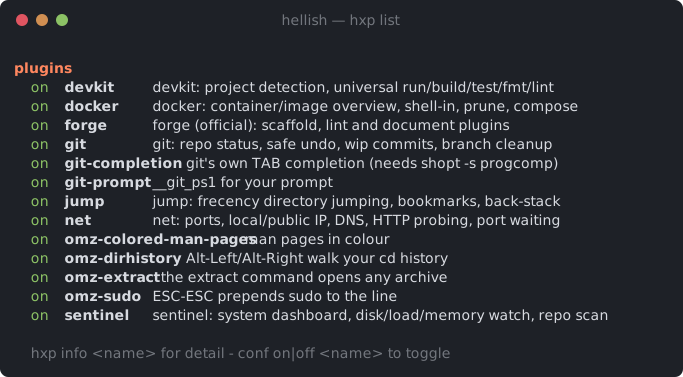
What you get
Open a new shell and ask it:
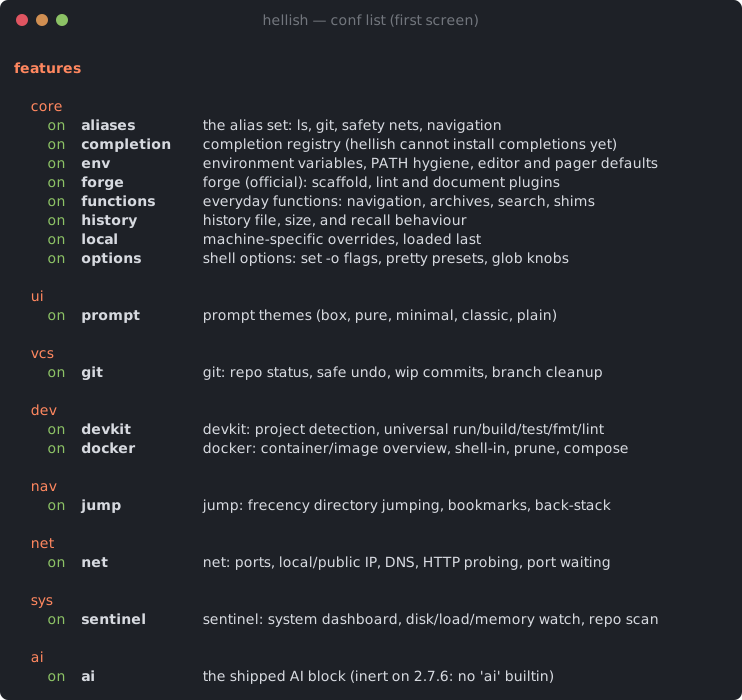
conf is the wider switchboard — plugins and the framework's own modules
(aliases, history, prompt, completion…), all persisted in
~/.hellish/hellish.conf:
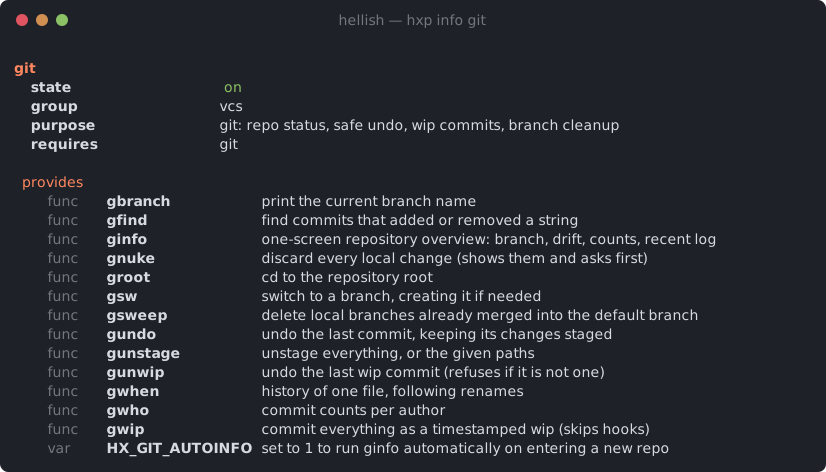
Everything is documented from inside: hxp info <name> shows what a plugin
provides, needs, and whether anything is missing on this machine:
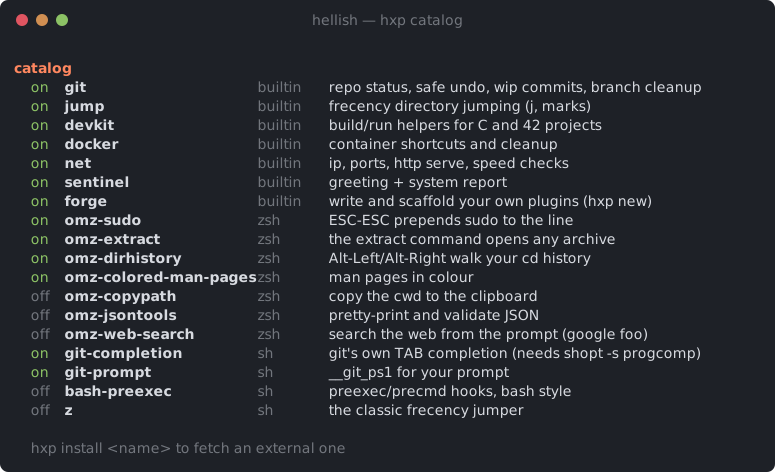
The catalog — and installing more
hxp catalog shows everything installable, installed or not. The externals
are the plugins hellish's own test corpus proves on every CI run:
Installing one is one command — fetched, wrapped, and toggleable like any other plugin:

| plugins | |
|---|---|
| builtin (ship with the framework) | git jump devkit docker net sentinel forge |
| oh-my-zsh (fetched, run through the zsh dialect) | omz-sudo omz-extract omz-dirhistory omz-colored-man-pages omz-copypath omz-jsontools omz-web-search |
| classics (plain sh/bash) | git-completion git-prompt bash-preexec z |
A fetched .zsh file keeps its extension — sourcing a .zsh path is what
arms hellish's zsh dialect for that file,
so a real oh-my-zsh plugin parses as zsh without any shim. Installing
git-completion also arms shopt -s progcomp, because choosing a
completion plugin is answering that question.
Coming from zsh, or oh-my-zsh
Every 42 account logs into zsh. hellish does not run your ~/.zshrc:
it is code written for zsh — one began with exec /bin/bash, one ran
compinit and twenty zstyles — and a shell that is not zsh has no
business executing it. Your aliases and git shortcuts come to hellish
through the framework above and ~/.hellishrc; the zsh config stays
zsh's. (For three releases the installer imported it by default; issues
113–#116 are what that produced.)
If you want it anyway, ask for it by name — sh install.sh --zshrc — and
the file loads inside hellish in the zsh dialect, best effort, from
~/.config/hellish/after.d/90-zshrc.zsh. after.d is sourced after
~/.hellishrc and the framework, so your zsh config keeps the last word.
In that mode source $ZSH/oh-my-zsh.sh is understood rather than refused:
- the plugins your
plugins=(…)names load, from$ZSH_CUSTOM/pluginsfirst and$ZSH/pluginssecond, in order —gst,gco,gwipand the rest of the git plugin,extract,sudo,z…; $ZSH_CUSTOM/*.zshload after them, as in oh-my-zsh;- plugins that are the zsh line editor (
zsh-autosuggestions,zsh-syntax-highlighting,history-substring-search,vi-mode…) are skipped silently — nothing in them can work without ZLE; - themes,
lib/andcompinitare zsh's own and are not loaded. The prompt is hellish's:promptlists the 29 themes it ships.
A plain re-run of the installer switches the import off again (the file is
kept as .off). Any syntax error in that chain is reported once, with the
file and line, and the line itself.
Daily driving
conf list                what is on and off       conf on|off <name>
conf doctor              anything wrong with the load
help_conf                every alias, function, variable and option, documented
hxp list                 installed plugins        hxp info <name>
hxp catalog              everything installable
hxp install <name>       fetch an external plugin
hxp remove <name>        delete a fetched one
hxp update [name]        re-fetch one, or every external
hxp doctor               missing external dependencies
Toggles persist (hellish.conf); a disabled plugin costs one line at load.
Writing your own
A plugin is ~/.hellish/plugins/<name>/plugin.hsh whose first executable
line is the contract:
hx_plugin <name> <on|off> <group> "one-line description" || return 0
After that line the plugin is enabled. Declare external dependencies with
hx_needs <cmd>… (they degrade, never explode — hxp doctor reports),
and document what you define with hx_alias_doc / hx_func_doc so
hxp info and help_conf can explain you. hxp new <name> (the forge
plugin) scaffolds all of it, and forge lint checks the contract.
Want it in the catalog for everyone? One TSV line in
plugins/catalog.tsv
— name, kind, URL, default, description. Nothing else changes: the
installer and hxp install both read that file.
Bare-metal plugins, no framework
The framework is optional. hellish's own rc loader sources
$XDG_CONFIG_HOME/hellish/plugins/*/plugin.hsh on interactive startup, so
a directory with a plugin.hsh is already a plugin. And any zsh or bash
plugin can simply be sourced from ~/.hellishrc:
source ~/plugins/git-prompt.sh          # plain bash: as-is
source ~/plugins/sudo.plugin.zsh        # .zsh: the dialect arms itself
The 13-plugin corpus that CI runs against both the release and the ASan build is the honest list of what loads today — a plugin that starts working turns its row red until the expectation is updated, so that list cannot rot.